Environment Admin Apps
These apps allow customers to provide consent for TES to manage their Business central and/or Dynamics 365 environments through our systems in Azure DevOps.
Business Central
This is an application developed by TES to manage environments and apps installed in those environments. Some setup is required to grant permissions to this application in your Business Central environments.
The Business Central admin client id is:
a271d1b2-1c8c-45f0-b4aa-01e2c6ae3a58
Admin Consent
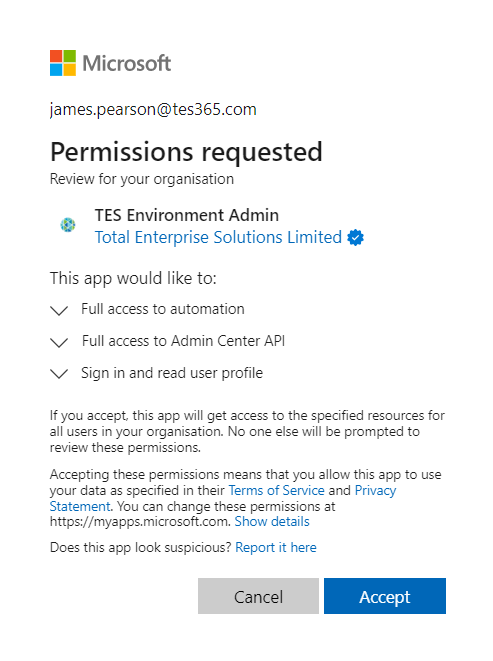
An administrator will need to grant consent for the TES Environment Admin app. This gives permission for the app to access:
- the Business Central Admin API - which is used to see and manage Business Central environment details
- the Business Central Automation API - which is used to install apps into environments
Granting Consent
In a browser logged in with an administrator account visit the following link (the client id is the unique identifier for this application in Azure):
https://login.microsoftonline.com/common/adminconsent?client_id=a271d1b2-1c8c-45f0-b4aa-01e2c6ae3a58
You will be prompted to grant the permissions described above.
Entra Applications in Business Central
This part of the setup will be completed in each environment by TES.
Within each Business Central environment, to be managed by our automation, we will create an Entra Application.
Search for Microsoft Entra Applications to see a list of applications which are authorised to access data in this environment.
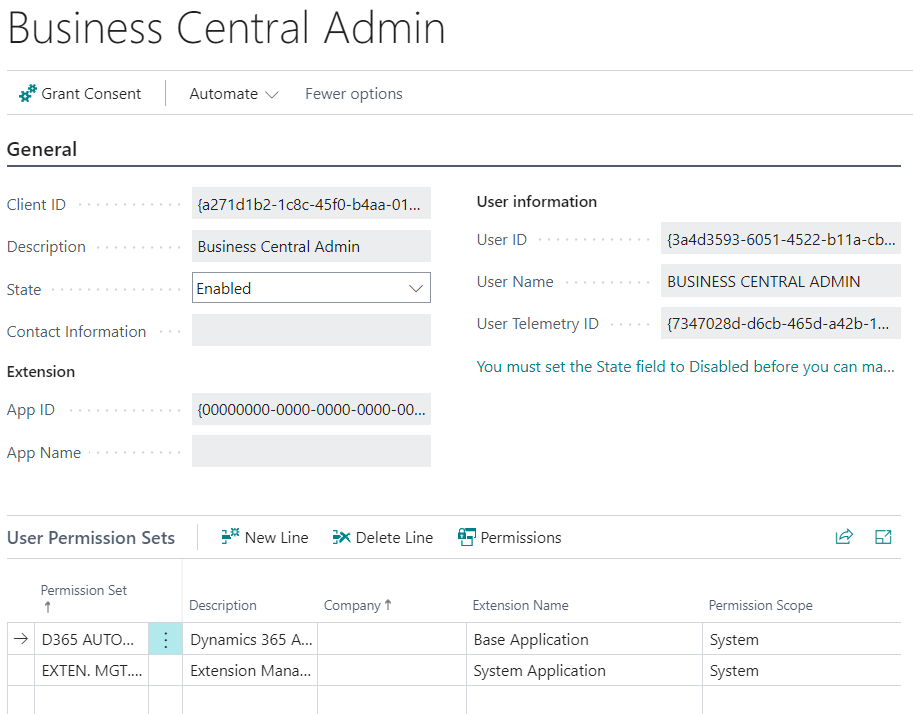
A new application will be registered with the Client ID of a271d1b2-1c8c-45f0-b4aa-01e2c6ae3a58 (the same ID granted admin consent above). The following permission sets will be granted:
- D365 AUTOMATION
- EXTEN. MGT. - ADMIN
A new user will be created in this Business Central environment to record changes which are made in this environment through our automation.
Q: Will the Environment Admin app be used to access our data?
No, the Environment Admin app will only be used to read metadata about your Business Central environments (the environment name and type, the apps which are installed) and to deploy new versions of our Business Central solutions.
The minimum of permission sets required to allow the app to deploy new versions of our apps will be granted on the Entra Application record.
Business Central Admin Centre
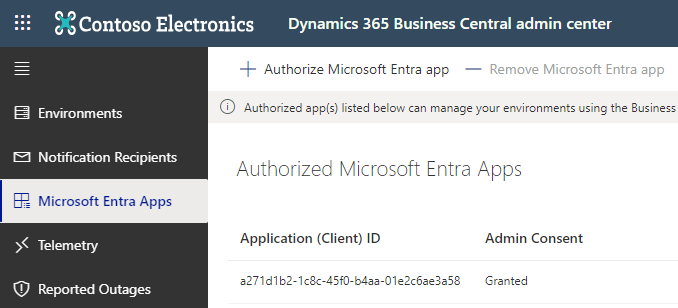
The list of Authorised Microsoft Entra Apps is also available in the Business Central Admin Centre. Log in to the admin centre at https://businesscentral.dynamics.com/your_Microsoft_tenant_id/admin. Replace "your Microsoft tenant id" with your tenant id. You can find your tenant id from the Help and Support menu within Business Central.
You will see a record for an app with id a271d1b2-1c8c-45f0-b4aa-01e2c6ae3a58 and whether Admin Consent has been granted.
Revoking Access
If you ever want to revoke access for our app to the Business Central APIs you can select the app in the Business Central Admin Centre and click Remove Microsoft Entra app.
Dynamics 365
The D365 Environment Admin app has been created to give TES the ability to manage D365 environments and deploy solutions into them from our internal systems.
The D365 Environment Admin client id is:
4ceda86e-2262-4019-9318-768205d4bef9
Admin Consent
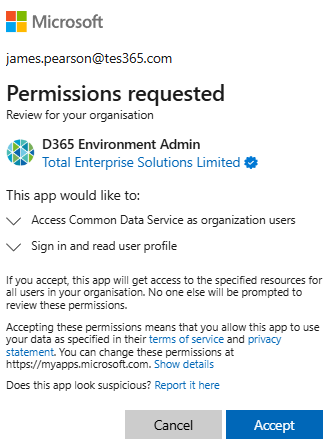
It is first necessary for an administrator to grant consent to give the app access to the resources that it needs. The easiest way to grant consent is to follow this link:
https://login.microsoftonline.com/common/adminconsent?client_id=4ceda86e-2262-4019-9318-768205d4bef9
Register Application with PAC
The second step is to register the application with the Entra tenant using the pac command line tool. The easiest way to install the tool is using the dotnet tool command:
dotnet tool install Microsoft.PowerApps.CLI.Tool --global
Create an auth profile with an account which has permissions to manage D365 Entra applications:
pac auth create
With no further switches this command will open a browser and prompt you to login to the correct Azure account. You can then use pac auth select to switch to that auth context for further commands.
The below command registers the D365 Environment Admin app (identified by its client id) as an application which can manage D365 environments.
pac admin application register -id 4ceda86e-2262-4019-9318-768205d4bef9